



Introduction
The classroom of 2025 is increasingly “blended,” combining traditional teaching methods with digital tools to enhance learning. Among the most transformative additions are AI-powered educational tools, which help teachers plan lessons, personalize instruction, and provide real-time feedback. Successfully integrating ai tutors into daily teaching workflows allows educators to save time, engage students more effectively, and focus on high-impact teaching strategies.
Benefits of a Blended AI Classroom
- Efficiency: AI can automate grading, lesson planning, and content creation, freeing teachers for instructional interactions.
- Personalization: Adaptive AI tools identify individual student needs, providing targeted support and differentiated learning paths.
- Engagement: Interactive AI platforms offer quizzes, simulations, and problem-solving activities that enhance participation.
- Data-Driven Decisions: AI analytics provide insights into student performance, helping teachers make informed instructional adjustments.
Key AI Tools for Daily Teaching
1. Lesson Planning and Content Creation
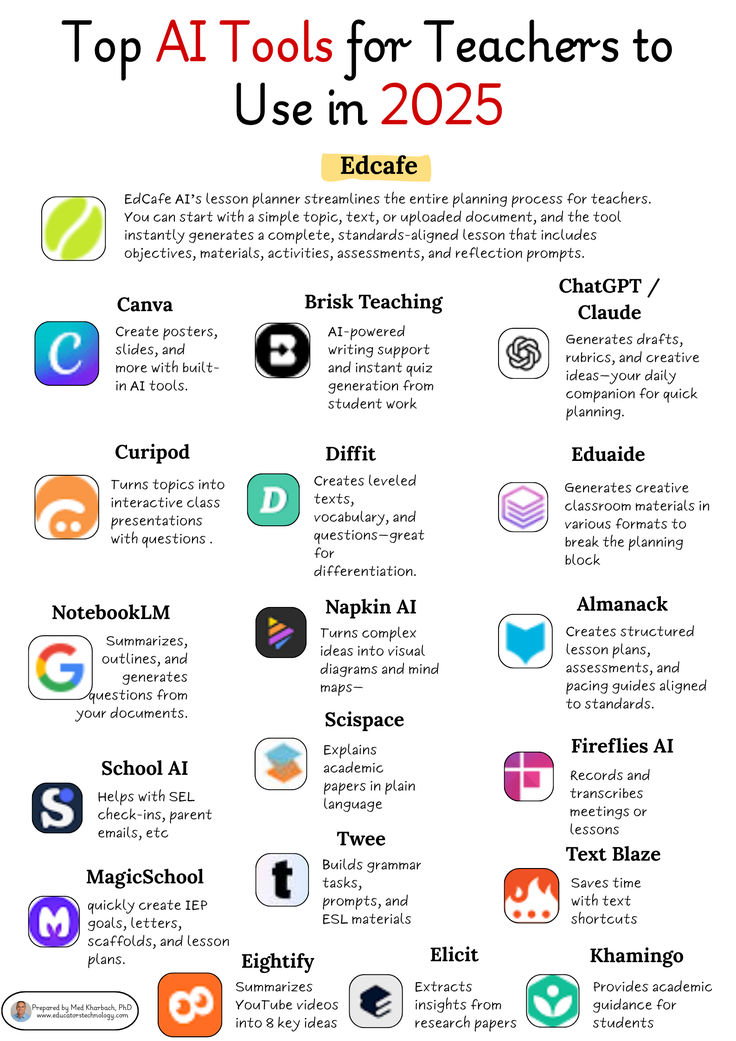
- ChatGPT: Generates lesson outlines, discussion prompts, and differentiated activities based on curriculum objectives.
- Notion AI: Organizes course materials, creates summaries, and generates personalized content for students.
2. Assessment and Feedback
- Quizlet AI: Produces flashcards, quizzes, and adaptive review materials to reinforce learning.
- Gradescope AI: Automates grading of assignments and provides analytics on common misconceptions.
3. Classroom Engagement and Collaboration
- Kahoot AI: Creates interactive quizzes and games tailored to student skill levels.
- Miro AI: Supports collaborative mind maps and visual brainstorming for group projects.
4. Student Support and Tutoring
- Khanmigo: Provides curriculum-aligned tutoring for students needing extra help in math, science, and other subjects.
- Socratic by Google: Offers step-by-step solutions and explanations for problem-solving exercises.
Strategies for Seamless Integration
1. Start Small and Scale Gradually
Introduce one AI tool at a time, such as an AI quiz generator or content assistant, to prevent overwhelm. Once familiar, expand to other platforms for a holistic workflow.
2. Align AI Tools with Learning Objectives
Ensure that each AI tool supports the goals of the lesson. For instance, use adaptive quizzes to reinforce key concepts rather than as a standalone activity.
3. Blend AI with Traditional Instruction
Combine AI-generated materials with discussion, group work, and hands-on activities to maintain human interaction and engagement.
4. Leverage Analytics for Personalized Support
Use AI performance data to identify students who need additional attention or enrichment, then provide targeted interventions.
5. Encourage Student Autonomy
Teach students how to use AI tools for self-study, practice, and exploration, fostering independent learning habits.
Best Practices for Teachers
- Evaluate AI tools regularly to ensure accuracy and alignment with curriculum standards.
- Maintain a balance between automated and human-led instruction.
- Encourage critical thinking by having students explain AI-generated content in their own words.
- Protect student privacy by choosing AI platforms that comply with data security and educational regulations.
- Continuously reflect on workflow efficiency and student outcomes to refine AI integration.
Conclusion
Integrating AI tools into the blended classroom offers educators a powerful way to enhance instruction, personalize learning, and streamline administrative tasks. Platforms like ChatGPT, Notion AI, Quizlet AI, and Khanmigo provide versatile support for lesson planning, assessment, student engagement, and tutoring. By thoughtfully embedding AI into daily workflows, teachers in 2025 can create classrooms that are more efficient, interactive, and responsive to individual student needs—ultimately fostering a more effective and engaging learning experience.
