

Close Menu
WorldWise Pulse

    Subscribe to Updates

    Get the latest creative news from FooBar about art, design and business.

    What's Hot

    Online Poker Security: How to Keep Your Account and Funds Safe

    January 18, 2026

    Luxury Marketing Agency: Crafting Desire, Prestige, and Brand Legacy

    January 17, 2026

    KM77: The Ultimate Gaming Experience for Competitive Players

    January 17, 2026
    Facebook X (Twitter) Instagram
    Facebook X (Twitter) Instagram
    WorldWise PulseWorldWise Pulse
    • Home
    • Garden & Outdoor
    • Health & Care
    • Categories
      • Business & Industrial
      • Fashion & Beauty
      • Baby & Parenting
      • Home Decor
      • Automotive & Vehicles
      • Internet & Telecom
      • Jobs & Education
      • Law & Government
      • Lifestyle
      • Pets & Animals
      • Real Estate
      • Science & Inventions
      • Sports & Camping
      • Technology
      • Travel & Leisure
    • Write For Us
    • Contact Us
      • Affiliate Disclosure
      • Privacy Policy
      • Disclaimer
    WorldWise Pulse
    Home»Technology»A Complete Guide to Hard Drive PCB Replacement: When and How to Do It
    Technology

    A Complete Guide to Hard Drive PCB Replacement: When and How to Do It

    Bisma AzmatBy Bisma AzmatAugust 5, 2025No Comments
    Facebook Twitter Pinterest LinkedIn WhatsApp Reddit Tumblr Email
    Share
    Facebook Twitter LinkedIn Pinterest Email

    When a hard drive fails, most people fear the worst—permanent data loss. However, not all drive failures are catastrophic. Sometimes, the problem lies in the Printed Circuit Board (PCB) of the drive. If this is the case, there may be a solution: replacing the PCB. In this article, we’ll explore a complete guide to hard drive PCB replacement: when and how to do it, including signs of PCB failure, steps to take, and key precautions.

    Contents

    Toggle
    • What Is a Hard Drive PCB?
    • When Should You Consider a Hard Drive PCB Replacement?
    • Tools and Precautions Before Attempting Replacement
    • How to Replace a Hard Drive PCB
      • Step 1: Identify the Drive Model and PCB Number
      • Step 2: Transfer the BIOS/ROM Chip (If Necessary)
      • Step 3: Swap the PCB
      • Step 4: Test the Drive
    • Risks and Considerations
    • Conclusion

    What Is a Hard Drive PCB?

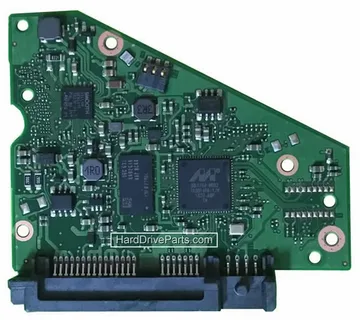
    The Printed Circuit Board (PCB) is the green (or blue) board attached to the bottom of a hard drive. It serves as the drive’s brain, managing power, data read/write operations, and communication with your computer. If the PCB malfunctions due to power surges, short circuits, or physical damage, your drive may stop working—even if the internal platters are intact.

    When Should You Consider a Hard Drive PCB Replacement?

    Understanding when it’s appropriate to consider a PCB replacement is crucial. Here are common signs that your hard drive’s PCB may be the issue:

    • Burnt smell or visible scorch marks on the PCB

    • No spinning or sound from the drive when connected to power

    • Drive not recognized by BIOS or the operating system

    • Sudden failure after a power surge or lightning strike

    If you encounter these symptoms and have ruled out cable, power supply, or software issues, a PCB replacement might be the answer.

    Tools and Precautions Before Attempting Replacement

    Before diving into a replacement, understand that this isn’t a casual DIY fix. You’ll need:

    • An identical donor PCB (same model, firmware, and PCB number)

    • A Torx screwdriver set

    • Antistatic wrist strap

    • Optional: Hot air rework station (for BIOS chip transfer)

    Important: Many modern hard drives have a BIOS chip (or ROM) on the PCB that stores calibration data unique to the drive. Without transferring this chip to the new board, the replacement will likely fail.

    How to Replace a Hard Drive PCB

    Now let’s go step-by-step through a complete guide to hard drive PCB replacement: when and how to do it:

    Step 1: Identify the Drive Model and PCB Number

    Find the exact model number, firmware version, and PCB code on the original drive. Use this info to locate a matching donor PCB—websites like HDDZone or donor drives from the same batch can help.

    Step 2: Transfer the BIOS/ROM Chip (If Necessary)

    If your drive requires ROM transfer:

    • Locate the ROM chip on the damaged PCB (often marked as U12 or similar)

    • Carefully desolder it using a heat gun or soldering iron

    • Solder the ROM chip onto the replacement PCB in the same orientation

    Step 3: Swap the PCB

    • Use a Torx screwdriver to remove the screws holding the old PCB

    • Install the donor PCB, ensuring all connectors align perfectly

    • Reattach screws and handle all components with anti-static precautions

    Step 4: Test the Drive

    Connect the drive to your computer. If the replacement was successful, the drive should spin up, be recognized, and data should be accessible. Immediately back up your data, as this may only be a temporary fix.

    Risks and Considerations

    Even following a complete guide to hard drive PCB replacement: when and how to do it, success is not guaranteed. Potential risks include:

    • Incompatibility between PCB versions

    • Failed BIOS chip transfer

    • Internal mechanical failure mistaken for PCB issues

    If your data is critical, consult a professional data recovery service before attempting any repair.

    Conclusion

    While not suitable for every failure, PCB replacement can be a cost-effective solution when done correctly. This article has walked you through a complete guide to hard drive PCB replacement: when and how to do it, helping you decide whether it’s the right move. With the right tools, knowledge, and care, you might just bring your drive—and your data—back to life.


    Share. Facebook Twitter Pinterest LinkedIn Tumblr Telegram Email
    Bisma Azmat
    • Website

    Related Posts

    A Beginner’s Guide to Investing in Global Shares

    December 16, 2025

    Top Chatbot Development Companies Redefining Customer Experience with AI 

    December 9, 2025

    Employee Monitoring Software vs. Spy Apps: Understanding the Key Differences

    December 6, 2025
    Leave A Reply Cancel Reply

    Demo
    Top Posts

    Online Poker Security: How to Keep Your Account and Funds Safe

    January 18, 2026

    First Look At Joaquin Phoenix in Ridley Scott Movie

    January 14, 2021
    7.2

    How to Choose the Best Bike for You, According to Bike Experts

    January 14, 2021

    More Brands are Making the ‘Easy Transition’ to Home Decor

    January 14, 2021
    Don't Miss
    Uncategorized

    Online Poker Security: How to Keep Your Account and Funds Safe

    By Najaf BhattiJanuary 18, 2026

    Introduction The online poker landscape in 2026 is both more crowded and more competitive than…

    Luxury Marketing Agency: Crafting Desire, Prestige, and Brand Legacy

    January 17, 2026

    KM77: The Ultimate Gaming Experience for Competitive Players

    January 17, 2026

    Agen Slot Terpercaya dengan Winrate Tinggi Hari Ini: Panduan untuk Pemain Cerdas

    January 17, 2026
    Stay In Touch
    • Facebook
    • Twitter
    • Pinterest
    • Instagram
    • YouTube
    • Vimeo

    Subscribe to Updates

    Get the latest creative news from SmartMag about art & design.

    Demo
    © 2026 ThemeSphere. Designed by ThemeSphere.
    • Home
    • Garden & Outdoor
    • Health & Care
    • Categories
      • Business & Industrial
      • Fashion & Beauty
      • Baby & Parenting
      • Home Decor
      • Automotive & Vehicles
      • Internet & Telecom
      • Jobs & Education
      • Law & Government
      • Lifestyle
      • Pets & Animals
      • Real Estate
      • Science & Inventions
      • Sports & Camping
      • Technology
      • Travel & Leisure
    • Write For Us
    • Contact Us
      • Affiliate Disclosure
      • Privacy Policy
      • Disclaimer

    Type above and press Enter to search. Press Esc to cancel.